Tuning and tempo are separate controls
Tuning sets the reference for musical pitches. At A4 = 440 Hz, the note A4 has a frequency of 440 Hz. Retuning the recording to A4 = 432 Hz lowers its pitches proportionally.
Tempo describes the rate of the musical pulse. 120 BPM means 120 beats per minute.
You can lower the pitches and keep the tempo. You can also slow the rhythm without lowering the notes. The software needs to know which operation you want.
Why does the recording sometimes get longer?
The simplest method behaves like slowing a tape: play the recording more slowly. Pitch and tempo both fall.
To move from 440 to 432 Hz, the speed multiplier is:
432 ÷ 440 ≈ 0.981818
| Parameter | Before | After slowing down |
|---|---|---|
| A4 reference | 440 Hz | 432 Hz |
| Tempo | 120 BPM | about 117.82 BPM |
| Track length | 4:00 | about 4:04.44 |
These are calculations for a uniform speed change. The extra seconds are not an error: they follow from the method used.
How can you lower the tuning without slowing down?
Use pitch shifting with tempo preserved.
The software processes the signal to lower the notes while preserving the rhythm and, as closely as possible, the duration. In our example, the goal is 432 Hz, still 120 BPM and still four minutes.
This is more complex than simply slowing playback. Depending on the algorithm, material and size of the change, audible artefacts may appear. Preserving tempo does not guarantee exactly the same duration in every tool, either. Check the precise export length when working with video.
Which converter setting should you choose?
| Your goal | Look for |
|---|---|
| Lower tuning, same rhythm | Pitch change with tempo preserved |
| Slower rhythm, same pitches | Tempo change with pitch preserved |
| Slowed-tape effect | Speed change without pitch preservation |
Button names vary. A “432 Hz” label alone does not explain which method is used. Read the setting description and compare file lengths after conversion. Audacity’s documentation also distinguishes these three operations.
Listen: one phrase, four versions
We created a simple original phrase. Compare 440 and 432 Hz at the same tempo, then try the slower and faster versions. The 440/432 Hz tuning difference is subtle; the faster example makes the separate role of tempo easier to hear.
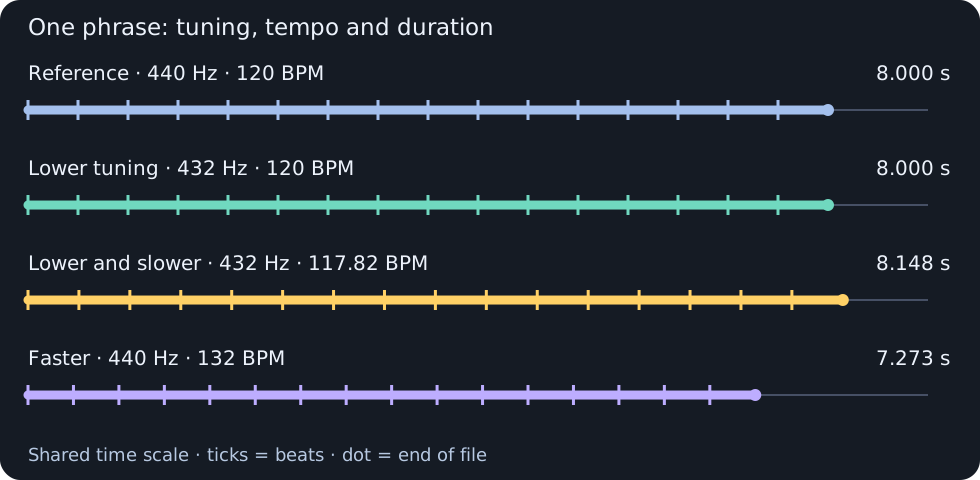
8.000 s · WAV · 48 kHz · 16-bit
8.000 s · WAV · 48 kHz · 16-bit
8.148 s · WAV · 48 kHz · 16-bit
7.273 s · WAV · 48 kHz · 16-bit
Each version was synthesised separately from specified notes and timings. These illustrate the principles, not the output of a particular converter or the quality of processing algorithms. Files: WAV, mono, 48 kHz, 16-bit PCM, with matched sample peaks rather than matched LUFS. Start at low volume. The graphic shows phrase and beat timings, not audio waveforms.
Check the starting point first
The 440 → 432 ratio makes sense if the recording was actually made with an A4 = 440 Hz reference.
If it is already tuned to 432 Hz, applying the same ratio again lowers it further. A converter follows instructions: it may not realise you are asking it to do the same job twice.
A whole song does not have one frequency. It contains many notes and instruments. Detecting a single pitch does not automatically establish the tuning of the whole recording. Audacity’s documentation cautions that its detected pitch is not a detection of musical key.
Try a short passage before the whole library
Keep the original and first convert a passage containing vocals, percussion and clear instrumental attacks. Listen for a metallic voice or softened, smeared attacks. These problems can accompany independent pitch or tempo processing.
Compare the duration as well, and check that exactly what you intended has changed.
Choose what should change first: tuning, tempo or both. Then press “Convert”.