What gets clipped?
Clipping changes the shape of the waveform. Peaks that exceed the available limit are flattened. The result can sound harsh, buzzy or clearly distorted. [1]
In a typical PCM file with integer samples, full scale is referenced to 0 dBFS. A red meter warns about level; listening and zooming into the waveform help establish what was actually recorded. [1]
Where you turn it down matters
If the recording input overloads, lowering the finished recording turns down both the sound and its distortion. If an effect clips halfway through the chain, reduce the signal before that effect. The final volume control may come after the damage has already happened. [2]
There is an important exception: floating-point processing can retain values above 0 dBFS. Reducing the level before the final export may then prevent clipping, provided an earlier effect has not already clipped the signal. [2]
Leave some headroom
Headroom leaves space for louder moments. Set levels using the loudest passage, rather than just a quiet introduction. [2]
- When recording, lower the input level or the source level if the recording overloads. [4]
- After adding effects, check the output level again and listen to the loudest passages.
- Keep the original and save an experimental version separately.
Listen: quieter does not mean repaired
We made an original short phrase. Compare the clean and clipped versions first, then listen to the same clipped version turned down.
The reference phrase without clipping.
Download WAVDeliberately clipped, then energy-matched to the first version.
Download WAVThe clipped waveform shape remains. Only its level has changed.
Download WAVAll files: 10 seconds, mono, 48 kHz, 16-bit WAV. The first two have matching RMS levels; this does not guarantee identical perceived loudness. The third is the second version attenuated by 9 dB. These are demonstrations, not tests of a particular application.
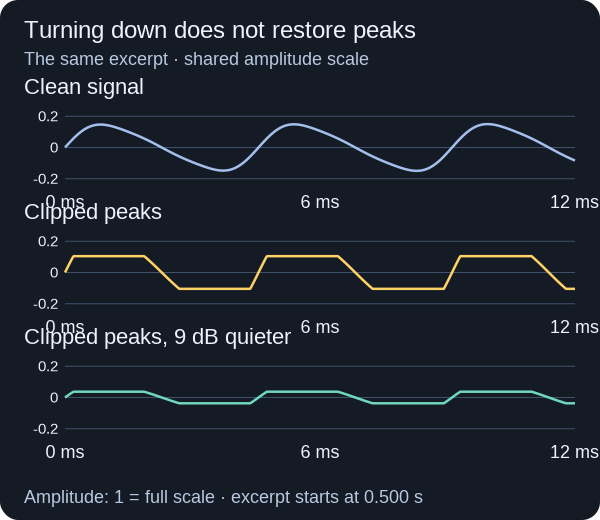
The chart shows the same 12-millisecond excerpt from the saved files on a shared amplitude scale. The flat sections remain after attenuation, even though they no longer reach full scale.
Can it be rescued?
De-clipping tools can estimate the missing peaks. They work best on light damage and cannot guarantee recovery of the original. If possible, return to a clean source or record the passage again. [3] [5]
Saving distorted audio as FLAC or WAV does not remove its distortion. The format can preserve it very faithfully, including the problem.