Two kinds of compression, two different goals
Dynamic range compression reduces differences in audio level. A typical downward compressor turns down louder moments that exceed a chosen threshold. [1]
MP3 reduces the data needed to store music. That is a separate process: a WAV can contain heavily compressed dynamics, while an MP3 can retain large contrasts between quiet and loud passages. [5]
What do the controls mean?
| Control | What does it do? |
|---|---|
| Threshold | The level above which the compressor reduces further increases. |
| Ratio | How strongly changes above the threshold are reduced. |
| Attack | How quickly gain reduction builds after a level increase. |
| Release | How quickly that reduction relaxes. |
| Make-up gain | Raises the level again after compression. |
For example, set a −18 dBFS threshold and a 4:1 ratio. A steady −10 dBFS signal is 8 dB above the threshold. An ideal hard-knee curve allows 2 dB of that excess through, giving −16 dBFS before make-up gain. This illustrates the principle, not the exact response to every brief hit. [4]
The beginning of a sound matters too
A fast attack can reduce the initial hit more strongly. A slower attack can preserve more of its impact. Release affects what happens to the next note; an unsuitable setting can cause audible level fluctuations, often called pumping. No single pair of settings suits every song. [2]
Listen to the difference
Our original phrase alternates between quieter and louder notes. Listen for how the gap between them changes.
A clear contrast between quiet and loud notes.
Download WAV−20 dBFS threshold, 3:1 ratio. Follow the louder notes.
Download WAV−30 dBFS threshold, 10:1 ratio. Level differences are reduced more strongly.
Download WAVEach example is a 10-second mono, 48 kHz, 16-bit WAV. We matched their whole-file RMS levels. Equal signal energy does not guarantee identical perceived loudness. These are demonstrations made with a simple model, not measurements of a particular application.
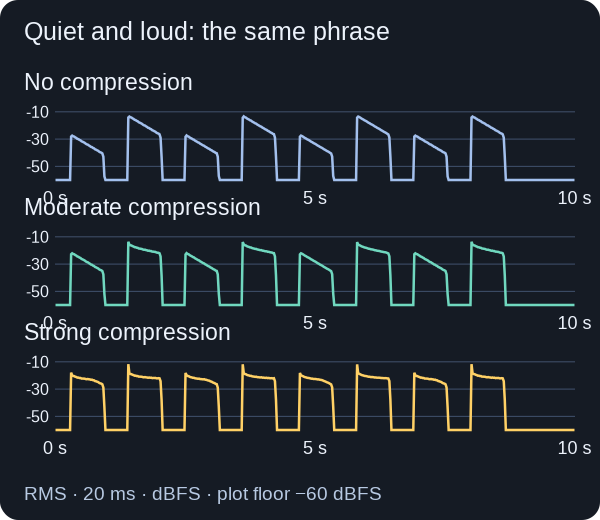
The chart measures the saved files in 20 ms windows on a shared scale. All three files have the same size despite their different dynamics.
When does compression help?
It can steady a vocal or reduce large level jumps. Strong processing can also expose background noise: make-up gain raises the whole signal, including noise. [4]
Compare the same passage at a similar listening level. It is easy to confuse louder with better. If the hits lose definition or the level seems to breathe unintentionally, reduce the compression and compare again. [3]
A finished song does not automatically need another compressor. Keep the original and save an experimental version separately. More processing is not always more music.