Gapless preserves the album transition
Gapless playback moves between tracks without inserting an extra pause. The last valid sample of one track is followed by the first valid sample of the next. No mixing or fading is required.
This matters for concerts, suites and albums whose tracks flow into one another. The title changes while the performance continues. If the recording contains intentional silence, gapless playback should preserve it. It does not mean automatically deleting every pause. [1]
Crossfade changes the transition
Crossfade fades out one track while introducing the next. With an overlapping crossfade, both play together briefly. That can suit a playlist, but changes a continuous album: drums, voices or melodies may overlap where they originally did not. [4] [5]
| Feature | What happens at the boundary? |
|---|---|
| Gapless | No added pause; the original material stays continuous. |
| Overlapping crossfade | The end of one track mixes with the beginning of the next. |
| Silence removal | Material classified as silence is cut; an intentional pause may disappear. |
These settings are not interchangeable. Start by turning crossfade and automatic silence trimming off when checking a continuous album.
Why can MP3 and AAC introduce silence?
MP3 or AAC encoding can require extra samples at the beginning and end: encoder delay and trailing padding. These are different from a pause recorded by the musicians.
Information identifying the valid audio lets a player discard that technical padding. LAME provides one such mechanism for MP3; AAC in a suitable container can also carry information needed for accurate trimming. [2] [3]
MP3 does not have to mean gaps. Equally, an “AAC supported” label does not establish seamless transitions. The files need suitable information, and the player must use it and prepare the next track in time. [1]
Listen to three transitions
We created an original eight-second musical phrase and split it exactly at four seconds. The same two parts produce three versions:
The two parts rejoined without adding or removing samples.
Download WAVExactly 12,000 zero samples were inserted after four seconds.
Download WAVThe last half-second of part A overlaps the first half-second of part B, with linear fades.
Download WAVEach example is a single WAV file, so browser file-switching does not affect the demonstration. These illustrate joining methods, not a particular player or codec. All examples are mono, 48 kHz, 16-bit, with the same source gain and no separate loudness matching.
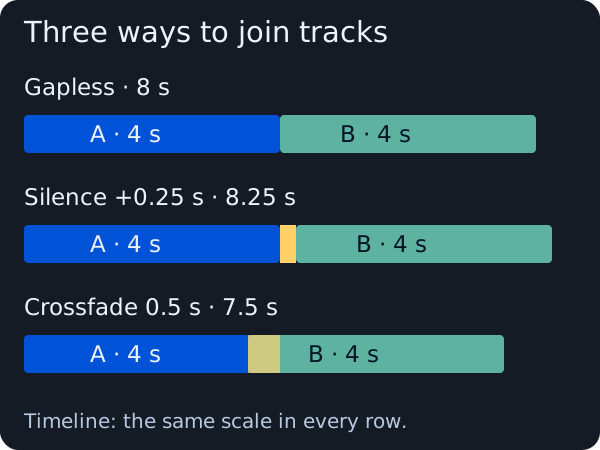
The overlapping crossfade counts the shared section once: 4 + 4 − 0.5 = 7.5 seconds. Adding silence gives 4 + 0.25 + 4 = 8.25 seconds. Gapless preserves the full eight seconds.
How to check your own album
- Choose adjacent tracks with a continuous transition. Unrelated playlist songs tell you little about gapless playback.
- Turn off crossfade, shuffle and silence removal. Play the end of the first track and let the player move to the next automatically.
- Try locally stored files. This helps distinguish the transition from a possible network wait.
- Compare the same files in another player. If only one adds a pause, check its settings and playback method.
- Check the recording itself. Silence already stored at a track boundary need not be removed by gapless playback.
Even WAV and FLAC can play with gaps if an application stops and restarts its audio output. A lossless format does not replace correct transition handling.
What to check when converting
Keep the originals and test two adjacent tracks first. Listen to the converted pair in your intended player before processing a whole concert.
Converting to WAV or FLAC cannot guess how much silence to remove. If an unwanted pause has already become part of the audio, a lossless export preserves it along with the music.
Do not blindly remove “the first 1024 samples” from every AAC file. The correct adjustment depends on the encoding and its stored information; a fixed cut can remove the start of the music. [2]
Let a concert flow as recorded, and mix a playlist to taste. Gapless serves the first purpose; crossfade can serve the second.