Same peak, different loudness
A brief, hard snare hit can set the highest peak of an entire recording. The music may be much quieter for the rest of the track. Another song may stay close to its peak almost constantly. Both can reach −1 dBFS, yet the second can sound louder. The highest point alone says little about the whole recording.
dBFS and LUFS answer different questions
Sample peak in dBFS tells you how close the largest sample is to full scale. 0 dBFS is the level limit in integer PCM, such as a typical 16-bit WAV. −6 dBFS means a lower level, not “negative sound”. Floating-point processing can hold values above zero internally, but that does not provide unlimited headroom at the device output.
LUFS measures loudness using a model that accounts for characteristics of human hearing. For whole tracks, compare integrated loudness. −14 LUFS is a higher measured loudness than −20 LUFS. It is a measurement model, not a promise that every listener will perceive an identical result.
True peak, in dBTP, estimates peaks in the reconstructed waveform between samples. These can exceed the highest stored sample. A sample peak of −1 dBFS therefore does not guarantee a true peak of −1 dBTP.
What does normalisation actually do?
Peak normalisation chooses a constant gain from the highest peak. If a file peaks at −10 dBFS and the target is −1 dBFS, it adds 9 dB throughout. Music, hiss and breaths all rise together. It does not bring quiet and loud passages closer together.
Loudness normalisation chooses gain using a loudness measurement such as LUFS. It is better suited to reducing level jumps between recordings. A constant gain change preserves the loudness differences within a track. Compression or limiting can change those differences: check whether your software adds either process.
A target that runs out of headroom
Suppose a recording measures −22 LUFS integrated and −3 dBTP. Adding 4 dB towards a −18 LUFS target would move its true peak to about +1 dBTP. There is not enough room. With a −1 dBTP ceiling, you can add only 2 dB, reaching roughly −20 LUFS. This is a worked calculation, not a measurement of our audio samples.
You can choose a lower loudness target or deliberately reduce peaks with a limiter. The second option alters the waveform. There is no single LUFS value that fits every song, film and release. Choose a target for the intended use and the recipient’s delivery requirements.
Listen: turning it down does not undo clipping
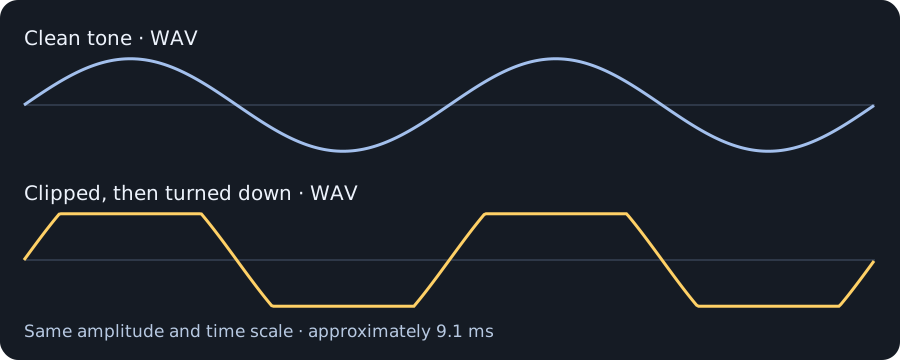
We created two original WAV files: 4 seconds each, mono, 48 kHz, 16-bit PCM. The first is a clean 220 Hz tone. For the second, we amplified that tone eightfold, clipped it at full scale, then turned it down. Both now peak at approximately −12.04 dBFS. Both have gentle fades at the start and end.
Start with low playback volume. The second sample illustrates the tonal change caused by clipping. It is not a recording of faulty equipment or an app test. We matched sample peaks, not LUFS, so this is not an equal-perceived-loudness comparison.
| Sample | Sample peak | Duration |
|---|---|---|
| Clean tone · WAV | -12.04 dBFS | 4 s |
| Clipped, then turned down · WAV | -12.04 dBFS | 4 s |
A library that needs less volume juggling
- Keep your originals. If your player offers loudness levelling, try it first. Check whether it adjusts playback or writes changes into files.
- If track and album modes are available, track mode reduces jumps in a mixed playlist. Album mode applies a shared gain to preserve the intended differences between tracks on an album.
- When exporting, check both integrated LUFS and true peak. If peaks leave too little headroom, lower the target or use a limiter deliberately.
- Listen to the loudest passage. Once clipping has been recorded, lowering the volume alone cannot reverse it. Repair tools can estimate the missing waveform, but cannot guarantee recovery of the original.
Louder does not mean cleaner. Sometimes the best adjustment is leaving the music a little breathing room.
Sources and fact-checking
- Audacity — Normalize
- Audacity — Loudness Normalisation
- ITU-R BS.1770 — loudness & true peak
- EBU R 128
- Audacity — Digital Audio Fundamentals
- Audacity — Clip Fix
- GStreamer — ReplayGain playback
Sources checked on 22 October 2026. The samples and plots are our own illustration, independent of any specific app’s features.